> ## Documentation Index
> Fetch the complete documentation index at: https://docs.pdf.co/llms.txt
> Use this file to discover all available pages before exploring further.
# Fill a PDF Form
> This feature is designed to fill out **PDF** forms automatically.
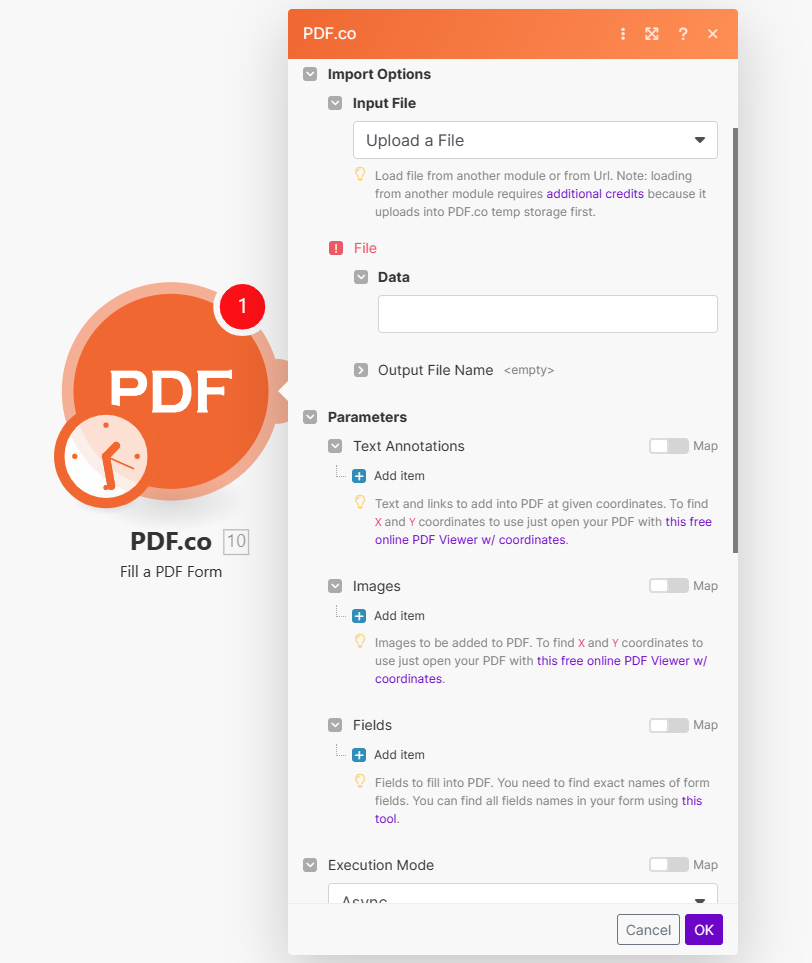 ## Input
| Name | Description | Required |
| ------------------ | ------------------------------------------------------------------------- | -------- |
| **Import Options** | Choose the input source, either `Upload a File` or `Import PDF from URL`. | Yes |
***
**Upload a File**
| Name | Description | Required |
| -------------------- | ------------------------------------------------------------------------------------------------------------------------------------------------------------------------------------ | -------- |
| **Data** | Upload a file using raw binary data from another module. Note: This requires additional credits as it first uploads to [PDF.co Temporary Files Storage](/api-reference/file-upload). | Yes |
| **Output File Name** | Specify a custom file name for the output file. | No |
**Import PDF from URL**
| Name | Description | Required |
| -------------------- | --------------------------------------------------------------------------------------------------------------------------------------------------------------------------------------------------------------------------------------------------------------------------------------------------- | -------- |
| **URL** | Provide the URL to the source **PDF** document, or a `filetoken://` link from [PDF.co Built-In Files Storage](https://app.pdf.co/files). If you use another cloud service such as **Google Drive** or **Dropbox** ensure the link is publicly accessible. Leave empty to create a new **PDF** file. | No |
| **Output File Name** | Specify a custom file name for the output file. | No |
## Parameters
### Text Annotations
| Name | Description | Required |
| ------------------ | -------------------------------------------------------------------------------------------------------------------------------------------------------------------------------------- | -------- |
| **X** | Determine the X coordinate for text placement. Use **PDF.co** [PDF Inspector](https://app.pdf.co/pdf-edit-add-helper) to find or measure **PDF** coordinates. | Yes |
| **Y** | Specify the Y coordinate. Use **PDF.co** [PDF Inspector](https://app.pdf.co/pdf-edit-add-helper) to find or measure **PDF** coordinates. | Yes |
| **Text** | Enter the text for the text object. Macros like line breaks (`\n` or `{{$$newLine}}`) or page numbers (`{{$$PageNumber}}`) can be inserted. | No |
| **Pages** | Default is `0` (first page). Use comma-separated ranges for multiple pages like `0,1-2,5,7-`. `7-` means from the 7th to the last page. Negative pages like `-2` for second last page. | No |
| **Font Size** | Specify the font size for the text. | No |
| **Font Italic** | Set the text to italic style. | No |
| **Font Bold** | Set the text to bold style. | No |
| **Font Strikeout** | Add a strikeout effect to the text. | No |
| **Font Underline** | Underline the text. | No |
| **Font Name** | Specify the font name. | No |
| **Font Color** | Set the font color using HTML color codes, e.g., `CCBBAA`. | No |
| **Link** | Add an optional clickable link (starting with `http://`, `https://`, `mailto:name@example.com`, etc.). | No |
| **Transparent** | Set the text background as transparent. | No |
| **Width** | Define the width of the text box. Coordinates start at the top left (use the provided viewer to measure coordinates). | No |
| **Height** | Define the height of the text box. Coordinates start at the top left (use the provided viewer to measure coordinates). | No |
| **Alignment** | Set text alignment as `Center`, `Right`, or `Left`. Default is `Center`. | No |
| **Type** | Choose the object type: regular text, input control fields, or checkboxes. | No |
| **Id** | Optional. For input fields (text fields or checkboxes), set the field name (or `id`). | No |
### Images
**Images**
| Name | Description | Required |
| ---------------------------- | -------------------------------------------------------------------------------------------------------------------------------------------------------------------------------------- | -------- |
| **X** | Determine the X coordinate for text placement. Use **PDF.co** [PDF Inspector](https://app.pdf.co/pdf-edit-add-helper) to find or measure **PDF** coordinates. | Yes |
| **Y** | Specify the Y coordinate. Use **PDF.co** [PDF Inspector](https://app.pdf.co/pdf-edit-add-helper) to find or measure **PDF** coordinates. | Yes |
| **URL to the source image.** | Provide a URL to the image, a base64 encoded image, or a `filetoken://` link from [PDF.co Built-In Files Storage](https://app.pdf.co/files). | Yes |
| **Pages or pages range.** | Default is `0` (first page). Use comma-separated ranges for multiple pages like `0,1-2,5,7-`. `7-` means from the 7th to the last page. Negative pages like `-2` for second last page. | No |
| **Link** | Optional link (`http://`, `https://`, `mailto:info@example.com` or similar) to open on click. | No |
| **Width** | Specify the width for the image. Leave empty for automatic detection. | No |
| **Height** | Specify the height for the image. Leave empty for automatic detection. | No |
### Fields
**Fields**
| Name | Description | Required |
| ------------------------ | -------------------------------------------------------------------------------------------------------------------------------------------------------------------------------------- | -------- |
| **Field Name** | Specify the exact names of the form fields that you intend to fill. | Yes |
| **Text** | Enter the text for the text object. Macros like line breaks (`\n` or `{{$$newLine}}`) or page numbers (`{{$$PageNumber}}`) can be inserted. | No |
| **Page or pages range.** | Default is `0` (first page). Use comma-separated ranges for multiple pages like `0,1-2,5,7-`. `7-` means from the 7th to the last page. Negative pages like `-2` for second last page. | No |
| **Font Size** | Specify the font size for the text. | No |
| **Font Italic** | Set the text to italic style. | No |
| **Font Bold** | Set the text to bold style. | No |
| **Font Strikeout** | Add a strikeout effect to the text. | No |
| **Font Underline** | Underline the text. | No |
| **Font Name** | Specify the font name. | No |
| **Font Color** | Set the font color using HTML color codes, e.g., `CCBBAA`. | No |
| Name | Description | Required |
| --------------------------- | ---------------------------------------------------------------------------------------------------------------------------------------------------------------------------------------------------------------- | -------- |
| **Template Data** | Use optional **JSON** data to reference inside annotations and fields, for example, `[[variable1]]` with **JSON** data like `{ 'variable1': 'hey hey'}`. | No |
| **Execution Mode** | Select **Sync** for small tasks up to `10` seconds. Choose **Async** for standard jobs, or **Async For Large Docs** for tasks over `30` seconds. Use **Job Check** module for retrieving results in large tasks. | No |
| **Profiles** | Add custom options for the process in a `JSON` string format. See [API Profiles](#profiles) for more details. | No |
| **Output Links Expiration** | Set the expiration time in minutes for output links. Default is `60` minutes. Increase this limit with a `Business Plan` or higher, see [plans here](https://app.pdf.co/subscriptions) for details. | No |
| **Export Type** | Choose between `Download a File` or `JSON Output`. Default is `Download a File`. | No |
### Integrating External File Sources
Streamline your **Make** workflows with external file sources like **Google Drive** and **Dropbox** using their unique actions. Discover efficient integration strategies in our guide: [File Source Integrations in Make](/integrations/make/input-file-sources).
## Output
| Name | Description |
| --------------------- | --------------------------------------------------------------------------------------------------------------------------------- |
| `url` | This is the temporary **URL** provided by the **PDF.co** file server. |
| `Data` | Represents the output binary data. This data is generated only when the `Export Type` option is set to `Download a File`. |
| `Status` | Indicates the [response status](/api-reference/introduction) code. A `success` status is returned if the operation is successful. |
| `Page Count` | The total number of pages in the output **PDF**. |
| `outputLinkValidTill` | Specifies the timestamp until which the `url` remains accessible. |
| `error` | Provides details about any errors encountered during the process, if applicable. |
| `name` | The designated name of the output file. |
| `Job Id` | A unique identifier assigned to the job. |
| `credits` | The amount of credits utilized for the process. |
| `Remaining Credits` | Displays the balance of credits available in your account. |
| `duration` | The duration of time the process took to complete. |
### Profiles
To display the Profiles fields, you must **enable Advanced Settings** by clicking the toggle:
## Input
| Name | Description | Required |
| ------------------ | ------------------------------------------------------------------------- | -------- |
| **Import Options** | Choose the input source, either `Upload a File` or `Import PDF from URL`. | Yes |
***
**Upload a File**
| Name | Description | Required |
| -------------------- | ------------------------------------------------------------------------------------------------------------------------------------------------------------------------------------ | -------- |
| **Data** | Upload a file using raw binary data from another module. Note: This requires additional credits as it first uploads to [PDF.co Temporary Files Storage](/api-reference/file-upload). | Yes |
| **Output File Name** | Specify a custom file name for the output file. | No |
**Import PDF from URL**
| Name | Description | Required |
| -------------------- | --------------------------------------------------------------------------------------------------------------------------------------------------------------------------------------------------------------------------------------------------------------------------------------------------- | -------- |
| **URL** | Provide the URL to the source **PDF** document, or a `filetoken://` link from [PDF.co Built-In Files Storage](https://app.pdf.co/files). If you use another cloud service such as **Google Drive** or **Dropbox** ensure the link is publicly accessible. Leave empty to create a new **PDF** file. | No |
| **Output File Name** | Specify a custom file name for the output file. | No |
## Parameters
### Text Annotations
| Name | Description | Required |
| ------------------ | -------------------------------------------------------------------------------------------------------------------------------------------------------------------------------------- | -------- |
| **X** | Determine the X coordinate for text placement. Use **PDF.co** [PDF Inspector](https://app.pdf.co/pdf-edit-add-helper) to find or measure **PDF** coordinates. | Yes |
| **Y** | Specify the Y coordinate. Use **PDF.co** [PDF Inspector](https://app.pdf.co/pdf-edit-add-helper) to find or measure **PDF** coordinates. | Yes |
| **Text** | Enter the text for the text object. Macros like line breaks (`\n` or `{{$$newLine}}`) or page numbers (`{{$$PageNumber}}`) can be inserted. | No |
| **Pages** | Default is `0` (first page). Use comma-separated ranges for multiple pages like `0,1-2,5,7-`. `7-` means from the 7th to the last page. Negative pages like `-2` for second last page. | No |
| **Font Size** | Specify the font size for the text. | No |
| **Font Italic** | Set the text to italic style. | No |
| **Font Bold** | Set the text to bold style. | No |
| **Font Strikeout** | Add a strikeout effect to the text. | No |
| **Font Underline** | Underline the text. | No |
| **Font Name** | Specify the font name. | No |
| **Font Color** | Set the font color using HTML color codes, e.g., `CCBBAA`. | No |
| **Link** | Add an optional clickable link (starting with `http://`, `https://`, `mailto:name@example.com`, etc.). | No |
| **Transparent** | Set the text background as transparent. | No |
| **Width** | Define the width of the text box. Coordinates start at the top left (use the provided viewer to measure coordinates). | No |
| **Height** | Define the height of the text box. Coordinates start at the top left (use the provided viewer to measure coordinates). | No |
| **Alignment** | Set text alignment as `Center`, `Right`, or `Left`. Default is `Center`. | No |
| **Type** | Choose the object type: regular text, input control fields, or checkboxes. | No |
| **Id** | Optional. For input fields (text fields or checkboxes), set the field name (or `id`). | No |
### Images
**Images**
| Name | Description | Required |
| ---------------------------- | -------------------------------------------------------------------------------------------------------------------------------------------------------------------------------------- | -------- |
| **X** | Determine the X coordinate for text placement. Use **PDF.co** [PDF Inspector](https://app.pdf.co/pdf-edit-add-helper) to find or measure **PDF** coordinates. | Yes |
| **Y** | Specify the Y coordinate. Use **PDF.co** [PDF Inspector](https://app.pdf.co/pdf-edit-add-helper) to find or measure **PDF** coordinates. | Yes |
| **URL to the source image.** | Provide a URL to the image, a base64 encoded image, or a `filetoken://` link from [PDF.co Built-In Files Storage](https://app.pdf.co/files). | Yes |
| **Pages or pages range.** | Default is `0` (first page). Use comma-separated ranges for multiple pages like `0,1-2,5,7-`. `7-` means from the 7th to the last page. Negative pages like `-2` for second last page. | No |
| **Link** | Optional link (`http://`, `https://`, `mailto:info@example.com` or similar) to open on click. | No |
| **Width** | Specify the width for the image. Leave empty for automatic detection. | No |
| **Height** | Specify the height for the image. Leave empty for automatic detection. | No |
### Fields
**Fields**
| Name | Description | Required |
| ------------------------ | -------------------------------------------------------------------------------------------------------------------------------------------------------------------------------------- | -------- |
| **Field Name** | Specify the exact names of the form fields that you intend to fill. | Yes |
| **Text** | Enter the text for the text object. Macros like line breaks (`\n` or `{{$$newLine}}`) or page numbers (`{{$$PageNumber}}`) can be inserted. | No |
| **Page or pages range.** | Default is `0` (first page). Use comma-separated ranges for multiple pages like `0,1-2,5,7-`. `7-` means from the 7th to the last page. Negative pages like `-2` for second last page. | No |
| **Font Size** | Specify the font size for the text. | No |
| **Font Italic** | Set the text to italic style. | No |
| **Font Bold** | Set the text to bold style. | No |
| **Font Strikeout** | Add a strikeout effect to the text. | No |
| **Font Underline** | Underline the text. | No |
| **Font Name** | Specify the font name. | No |
| **Font Color** | Set the font color using HTML color codes, e.g., `CCBBAA`. | No |
| Name | Description | Required |
| --------------------------- | ---------------------------------------------------------------------------------------------------------------------------------------------------------------------------------------------------------------- | -------- |
| **Template Data** | Use optional **JSON** data to reference inside annotations and fields, for example, `[[variable1]]` with **JSON** data like `{ 'variable1': 'hey hey'}`. | No |
| **Execution Mode** | Select **Sync** for small tasks up to `10` seconds. Choose **Async** for standard jobs, or **Async For Large Docs** for tasks over `30` seconds. Use **Job Check** module for retrieving results in large tasks. | No |
| **Profiles** | Add custom options for the process in a `JSON` string format. See [API Profiles](#profiles) for more details. | No |
| **Output Links Expiration** | Set the expiration time in minutes for output links. Default is `60` minutes. Increase this limit with a `Business Plan` or higher, see [plans here](https://app.pdf.co/subscriptions) for details. | No |
| **Export Type** | Choose between `Download a File` or `JSON Output`. Default is `Download a File`. | No |
### Integrating External File Sources
Streamline your **Make** workflows with external file sources like **Google Drive** and **Dropbox** using their unique actions. Discover efficient integration strategies in our guide: [File Source Integrations in Make](/integrations/make/input-file-sources).
## Output
| Name | Description |
| --------------------- | --------------------------------------------------------------------------------------------------------------------------------- |
| `url` | This is the temporary **URL** provided by the **PDF.co** file server. |
| `Data` | Represents the output binary data. This data is generated only when the `Export Type` option is set to `Download a File`. |
| `Status` | Indicates the [response status](/api-reference/introduction) code. A `success` status is returned if the operation is successful. |
| `Page Count` | The total number of pages in the output **PDF**. |
| `outputLinkValidTill` | Specifies the timestamp until which the `url` remains accessible. |
| `error` | Provides details about any errors encountered during the process, if applicable. |
| `name` | The designated name of the output file. |
| `Job Id` | A unique identifier assigned to the job. |
| `credits` | The amount of credits utilized for the process. |
| `Remaining Credits` | Displays the balance of credits available in your account. |
| `duration` | The duration of time the process took to complete. |
### Profiles
To display the Profiles fields, you must **enable Advanced Settings** by clicking the toggle:
 You can set additional options for the operation used in the [PDF.co](http://pdf.co/) module by using **Profiles**. A profile is a string in JSON-like format containing predefined parameters.
### Here’s an example of a Custom Profiles input:
```json theme={null}
{ "outputDataFormat": "base64" }
```
With this input, the [PDF.co](http://pdf.co/) module will return the output in base64 format. You can find the list of available parameters for customizing profiles in the [PDF.co](http://pdf.co/) operation documentation below:
You can use any regular API parameter from the [API Reference](/api-reference) within Make using the `std_params` feature in profiles. The `std_params` enables the definition of regular API parameters in a JSON format, See [Standard Parameters](/api-reference/profiles#standard-parameters) for detailed documentation and examples.
| Parameter | Type | Default | Description |
| ------------------------- | -------------- | ------- | ---------------------------------------------------------------------------------------------------------------------------------------------------------------------- |
| `outputDataFormat` | string | - | If you require your output as base64 format, set this to base64 |
| `Pages[0].SetCropBox()` | array\[string] | - | Crop a PDF file using an array to define the crop area. The crop box is defined by a rectangle \[x, y, width, height] in PDF points (1 Point = 1/72 inches). |
| `DisableLigatures` | boolean | `false` | To disable ligaturization, for example for Hebrew, use the following: |
| `FlattenDocument()` | boolean | `false` | Flattening a document renders it as read-only. Handy if you want to remove editing or copying capability. |
| `DataEncryptionAlgorithm` | string | - | Controls the encryption algorithm used for data encryption. See User-Controlled Encryption for more information. The available algorithms are: AES128, AES192, AES256. |
| `DataEncryptionKey` | string | - | Controls the encryption key used for data encryption. See User-Controlled Encryption for more information. |
| `DataEncryptionIV` | string | - | Controls the encryption IV used for data encryption. See User-Controlled Encryption for more information. |
| `DataDecryptionAlgorithm` | string | - | Controls the decryption algorithm used for data decryption. See User-Controlled Encryption for more information. The available algorithms are: AES128, AES192, AES256. |
| `DataDecryptionKey` | string | - | Controls the decryption key used for data decryption. See User-Controlled Encryption for more information. |
| `DataDecryptionIV` | string | - | Controls the decryption IV used for data decryption. See User-Controlled Encryption for more information. |
You can set additional options for the operation used in the [PDF.co](http://pdf.co/) module by using **Profiles**. A profile is a string in JSON-like format containing predefined parameters.
### Here’s an example of a Custom Profiles input:
```json theme={null}
{ "outputDataFormat": "base64" }
```
With this input, the [PDF.co](http://pdf.co/) module will return the output in base64 format. You can find the list of available parameters for customizing profiles in the [PDF.co](http://pdf.co/) operation documentation below:
You can use any regular API parameter from the [API Reference](/api-reference) within Make using the `std_params` feature in profiles. The `std_params` enables the definition of regular API parameters in a JSON format, See [Standard Parameters](/api-reference/profiles#standard-parameters) for detailed documentation and examples.
| Parameter | Type | Default | Description |
| ------------------------- | -------------- | ------- | ---------------------------------------------------------------------------------------------------------------------------------------------------------------------- |
| `outputDataFormat` | string | - | If you require your output as base64 format, set this to base64 |
| `Pages[0].SetCropBox()` | array\[string] | - | Crop a PDF file using an array to define the crop area. The crop box is defined by a rectangle \[x, y, width, height] in PDF points (1 Point = 1/72 inches). |
| `DisableLigatures` | boolean | `false` | To disable ligaturization, for example for Hebrew, use the following: |
| `FlattenDocument()` | boolean | `false` | Flattening a document renders it as read-only. Handy if you want to remove editing or copying capability. |
| `DataEncryptionAlgorithm` | string | - | Controls the encryption algorithm used for data encryption. See User-Controlled Encryption for more information. The available algorithms are: AES128, AES192, AES256. |
| `DataEncryptionKey` | string | - | Controls the encryption key used for data encryption. See User-Controlled Encryption for more information. |
| `DataEncryptionIV` | string | - | Controls the encryption IV used for data encryption. See User-Controlled Encryption for more information. |
| `DataDecryptionAlgorithm` | string | - | Controls the decryption algorithm used for data decryption. See User-Controlled Encryption for more information. The available algorithms are: AES128, AES192, AES256. |
| `DataDecryptionKey` | string | - | Controls the decryption key used for data decryption. See User-Controlled Encryption for more information. |
| `DataDecryptionIV` | string | - | Controls the decryption IV used for data decryption. See User-Controlled Encryption for more information. |