> ## Documentation Index
> Fetch the complete documentation index at: https://docs.pdf.co/llms.txt
> Use this file to discover all available pages before exploring further.
# PDF Security
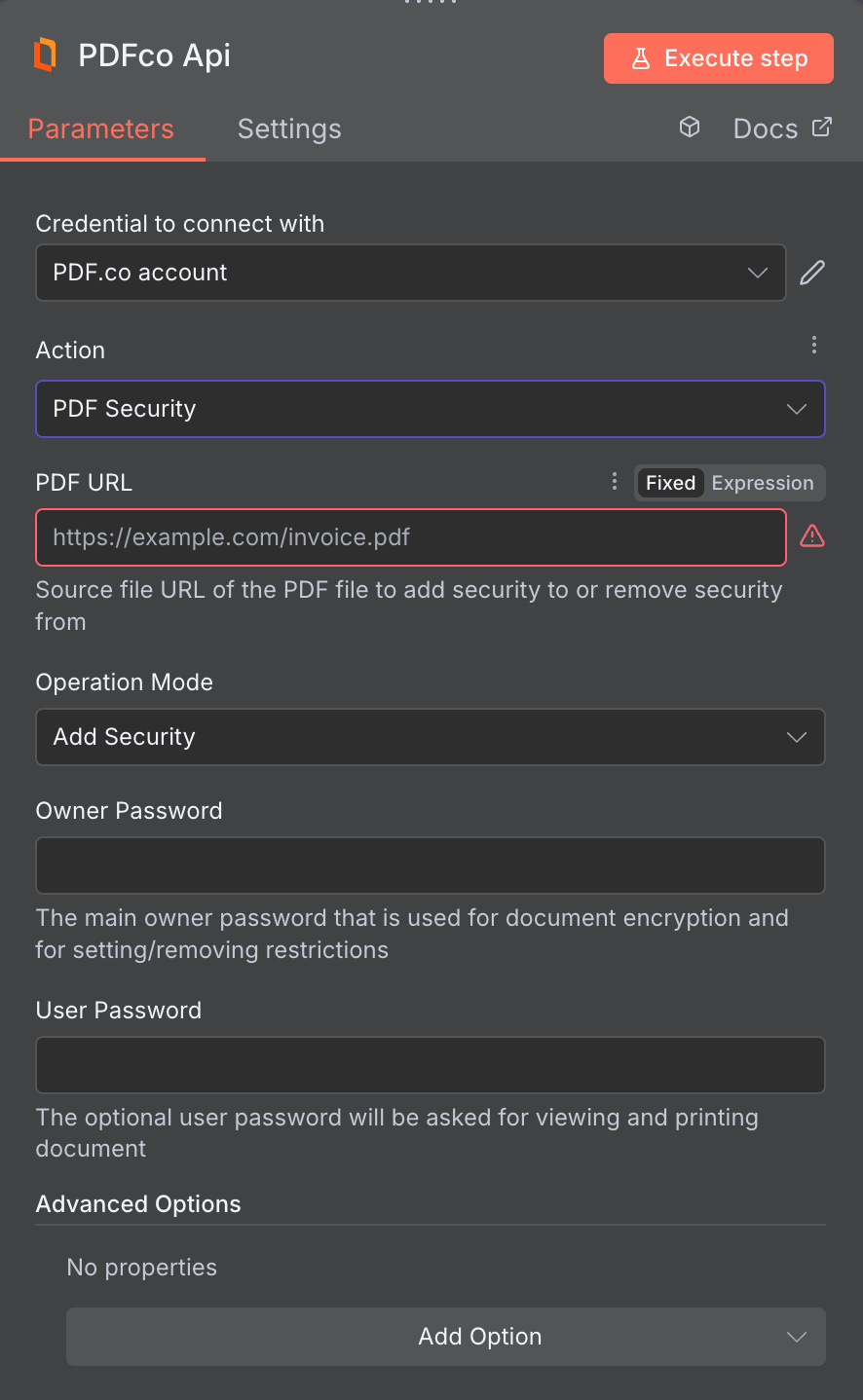
> This operation allows you to add or remove security features such as passwords, accessibility restrictions, and modification limitations to your document.
 **Modifying Restriction Settings**: To modify assembly or extraction settings that control PDF restrictions (such as `allowPrintDocument`, `allowFillForms`, `allowModifyDocument`, `allowAssemblyDocument`, and related permission settings), you **must** use the `ownerPassword` in your request. The `userPassword` alone cannot modify these permission settings. Attempting to change these restrictions with only a `userPassword` will result in an error: `"This file is password-protected. Please ensure you've entered the correct password…"`. This requirement applies only when making changes to those restrictions.
## Input
| Name | Description | Required |
| :--------------------------------------- | :---------------------------------------------------------------------------------------------------------------------------------------------------------------------------------------------------------------------------------------------------------------------------------------------------------------------------------------------------------------------------------------------------------------------------------------------------------------------------------------------- | :------------------------------------ |
| **PDF URL** | Provide the URL to the source PDF document, or a `filetoken://` link from [PDF.co Built-In Files Storage](https://app.pdf.co/tools/files). If you use another cloud service such as **Google Drive** or **Dropbox** ensure the link is publicly accessible. | Yes |
| **Operation Mode** | Choose whether you want to add or remove security features from PDF documents. | Yes |
| **Owner password** | The main owner password that is used for document encryption and for setting/removing restrictions. | Fill at least one for Remove Security |
| **User Password** | The optional user password will be asked for viewing and printing document. | Fill at least one for Remove Security |
| **Encryption Algorithm** | Encryption algorithm. `AES_128bit` or higher is recommended. The available algorithms are: `RC4_40bit`, `RC4_128bit`, `AES_128bit`, `AES_256bit`. | No |
| **Allow Accessibility Support** | Allow content extraction for accessibility. Applies only if a User password is set, bypassed if the file is accessed using the Owner Password. | No |
| **Allow Document Assembly** | Allow document assembly. Applies only if a User password is set, bypassed if the file is accessed using the Owner Password. | No |
| **Allow Printing** | Allow printing. Applies only if a User password is set, bypassed if the file is accessed using the Owner Password. | No |
| **Allow Form Filling** | Allow form filling. Applies only if a User password is set, bypassed if the file is accessed using the Owner Password. | No |
| **Allow Document Modification** | Allow document modification. Applies only if a User password is set, bypassed if the file is accessed using the Owner Password. | No |
| **Allow Content Extraction** | Allow content extraction. Applies only if a User password is set, bypassed if the file is accessed using the Owner Password. | No |
| **Allow Annotation Modification** | Allow annotation modification. Applies only if a User password is set, bypassed if the file is accessed using the Owner Password. | No |
| **Print Quality** | Specify the allowed printing quality. | No |
| **File Name** | File name for the generated output, the input must be in string format. | No |
| **Webhook URL** | The callback URL or Webhook used to receive the output data. | No |
| **Output Links Expiration (In Minutes)** | Set the expiration time for the output link in minutes. After this specified duration, any generated output file(s) will be automatically deleted from [**PDF.co Temporary Files Storage**](/api-reference/file-upload/overview). The maximum duration for link expiration varies based on your current subscription plan. To store permanent input files (e.g. re-usable images, pdf templates, documents) consider using [**PDF.co Built-In Files Storage**](https://app.pdf.co/tools/files). | No |
| **Custom Profiles** | Use JSON to customize PDF processing with options like output resolution, OCR settings, text extraction methods, encryption, and image handling. Check our [Custom Profiles](#custom-profiles) section to see all available parameters for your current endpoint. | No |
## Custom Profiles
You can set additional options for the operation used in the PDF.co node by using **Custom Profiles**. A custom profile is a string in **JSON-like** format containing predefined parameters.
Here’s an example of a Custom Profiles input:
```
{ "outputDataFormat": "base64" }
```
With this input, the PDF.co operation will return the output in `base64` format. You can find the list of available parameters for customizing profiles in the PDF.co operation documentation below:
You can use any regular API parameter from the [API Reference](/api-reference) within n8n using the `std_params` feature in profiles. The `std_params` enables the definition of regular API parameters in a JSON format, See [Standard Parameters](/api-reference/profiles#standard-parameters) for detailed documentation and examples.
| Parameter | Type | Default | Description |
| :------------------------ | :----- | :------ | :---------------------------------------------------------------------------------------------------------------------------------------------------------------------------------------------------------------------------- |
| `outputDataFormat` | string | - | If you require your output as `base64` format, set this to `base64` |
| `DataEncryptionAlgorithm` | string | - | Controls the encryption algorithm used for data encryption. See [**User-Controlled Encryption**](/knowledgebase/user-controlled-encryption) for more information. The available algorithms are: `AES128`, `AES192`, `AES256`. |
| `DataEncryptionKey` | string | - | Controls the encryption key used for data encryption. See [**User-Controlled Encryption**](/knowledgebase/user-controlled-encryption) for more information. |
| `DataEncryptionIV` | string | - | Controls the encryption IV used for data encryption. See [**User-Controlled Encryption**](/knowledgebase/user-controlled-encryption) for more information. |
| `DataDecryptionAlgorithm` | string | - | Controls the decryption algorithm used for data decryption. See [**User-Controlled Encryption**](/knowledgebase/user-controlled-encryption) for more information. The available algorithms are: `AES128`, `AES192`, `AES256`. |
| `DataDecryptionKey` | string | - | Controls the decryption key used for data decryption. See [**User-Controlled Encryption**](/knowledgebase/user-controlled-encryption) for more information. |
| `DataDecryptionIV` | string | - | Controls the decryption IV used for data decryption. See [**User-Controlled Encryption**](/knowledgebase/user-controlled-encryption) for more information. |
## Output
| Name | Description |
| :-------------------- | :------------------------------------------------------------------------------------------------------------------------------- |
| `jobId` | Unique identifier for the background job. |
| `pageCount` | Number of pages in the PDF document. |
| `error` | Indicates whether an error occurred (`false` means success) |
| `status` | Status code of the request (200, 404, 500, etc.). For more information, see [**Response Codes**](/api-reference/response-codes). |
| `credits` | Number of credits consumed by the request |
| `remainingCredits` | Number of credits remaining in the account |
| `duration` | Time taken for the operation in milliseconds |
| `url` | Direct URL to the final PDF file stored in S3. |
| `name` | Name of the output file |
| `outputLinkValidTill` | Timestamp indicating when the output link will expire |
**Modifying Restriction Settings**: To modify assembly or extraction settings that control PDF restrictions (such as `allowPrintDocument`, `allowFillForms`, `allowModifyDocument`, `allowAssemblyDocument`, and related permission settings), you **must** use the `ownerPassword` in your request. The `userPassword` alone cannot modify these permission settings. Attempting to change these restrictions with only a `userPassword` will result in an error: `"This file is password-protected. Please ensure you've entered the correct password…"`. This requirement applies only when making changes to those restrictions.
## Input
| Name | Description | Required |
| :--------------------------------------- | :---------------------------------------------------------------------------------------------------------------------------------------------------------------------------------------------------------------------------------------------------------------------------------------------------------------------------------------------------------------------------------------------------------------------------------------------------------------------------------------------- | :------------------------------------ |
| **PDF URL** | Provide the URL to the source PDF document, or a `filetoken://` link from [PDF.co Built-In Files Storage](https://app.pdf.co/tools/files). If you use another cloud service such as **Google Drive** or **Dropbox** ensure the link is publicly accessible. | Yes |
| **Operation Mode** | Choose whether you want to add or remove security features from PDF documents. | Yes |
| **Owner password** | The main owner password that is used for document encryption and for setting/removing restrictions. | Fill at least one for Remove Security |
| **User Password** | The optional user password will be asked for viewing and printing document. | Fill at least one for Remove Security |
| **Encryption Algorithm** | Encryption algorithm. `AES_128bit` or higher is recommended. The available algorithms are: `RC4_40bit`, `RC4_128bit`, `AES_128bit`, `AES_256bit`. | No |
| **Allow Accessibility Support** | Allow content extraction for accessibility. Applies only if a User password is set, bypassed if the file is accessed using the Owner Password. | No |
| **Allow Document Assembly** | Allow document assembly. Applies only if a User password is set, bypassed if the file is accessed using the Owner Password. | No |
| **Allow Printing** | Allow printing. Applies only if a User password is set, bypassed if the file is accessed using the Owner Password. | No |
| **Allow Form Filling** | Allow form filling. Applies only if a User password is set, bypassed if the file is accessed using the Owner Password. | No |
| **Allow Document Modification** | Allow document modification. Applies only if a User password is set, bypassed if the file is accessed using the Owner Password. | No |
| **Allow Content Extraction** | Allow content extraction. Applies only if a User password is set, bypassed if the file is accessed using the Owner Password. | No |
| **Allow Annotation Modification** | Allow annotation modification. Applies only if a User password is set, bypassed if the file is accessed using the Owner Password. | No |
| **Print Quality** | Specify the allowed printing quality. | No |
| **File Name** | File name for the generated output, the input must be in string format. | No |
| **Webhook URL** | The callback URL or Webhook used to receive the output data. | No |
| **Output Links Expiration (In Minutes)** | Set the expiration time for the output link in minutes. After this specified duration, any generated output file(s) will be automatically deleted from [**PDF.co Temporary Files Storage**](/api-reference/file-upload/overview). The maximum duration for link expiration varies based on your current subscription plan. To store permanent input files (e.g. re-usable images, pdf templates, documents) consider using [**PDF.co Built-In Files Storage**](https://app.pdf.co/tools/files). | No |
| **Custom Profiles** | Use JSON to customize PDF processing with options like output resolution, OCR settings, text extraction methods, encryption, and image handling. Check our [Custom Profiles](#custom-profiles) section to see all available parameters for your current endpoint. | No |
## Custom Profiles
You can set additional options for the operation used in the PDF.co node by using **Custom Profiles**. A custom profile is a string in **JSON-like** format containing predefined parameters.
Here’s an example of a Custom Profiles input:
```
{ "outputDataFormat": "base64" }
```
With this input, the PDF.co operation will return the output in `base64` format. You can find the list of available parameters for customizing profiles in the PDF.co operation documentation below:
You can use any regular API parameter from the [API Reference](/api-reference) within n8n using the `std_params` feature in profiles. The `std_params` enables the definition of regular API parameters in a JSON format, See [Standard Parameters](/api-reference/profiles#standard-parameters) for detailed documentation and examples.
| Parameter | Type | Default | Description |
| :------------------------ | :----- | :------ | :---------------------------------------------------------------------------------------------------------------------------------------------------------------------------------------------------------------------------- |
| `outputDataFormat` | string | - | If you require your output as `base64` format, set this to `base64` |
| `DataEncryptionAlgorithm` | string | - | Controls the encryption algorithm used for data encryption. See [**User-Controlled Encryption**](/knowledgebase/user-controlled-encryption) for more information. The available algorithms are: `AES128`, `AES192`, `AES256`. |
| `DataEncryptionKey` | string | - | Controls the encryption key used for data encryption. See [**User-Controlled Encryption**](/knowledgebase/user-controlled-encryption) for more information. |
| `DataEncryptionIV` | string | - | Controls the encryption IV used for data encryption. See [**User-Controlled Encryption**](/knowledgebase/user-controlled-encryption) for more information. |
| `DataDecryptionAlgorithm` | string | - | Controls the decryption algorithm used for data decryption. See [**User-Controlled Encryption**](/knowledgebase/user-controlled-encryption) for more information. The available algorithms are: `AES128`, `AES192`, `AES256`. |
| `DataDecryptionKey` | string | - | Controls the decryption key used for data decryption. See [**User-Controlled Encryption**](/knowledgebase/user-controlled-encryption) for more information. |
| `DataDecryptionIV` | string | - | Controls the decryption IV used for data decryption. See [**User-Controlled Encryption**](/knowledgebase/user-controlled-encryption) for more information. |
## Output
| Name | Description |
| :-------------------- | :------------------------------------------------------------------------------------------------------------------------------- |
| `jobId` | Unique identifier for the background job. |
| `pageCount` | Number of pages in the PDF document. |
| `error` | Indicates whether an error occurred (`false` means success) |
| `status` | Status code of the request (200, 404, 500, etc.). For more information, see [**Response Codes**](/api-reference/response-codes). |
| `credits` | Number of credits consumed by the request |
| `remainingCredits` | Number of credits remaining in the account |
| `duration` | Time taken for the operation in milliseconds |
| `url` | Direct URL to the final PDF file stored in S3. |
| `name` | Name of the output file |
| `outputLinkValidTill` | Timestamp indicating when the output link will expire |