> ## Documentation Index
> Fetch the complete documentation index at: https://docs.pdf.co/llms.txt
> Use this file to discover all available pages before exploring further.
# Document Classifier
> Integrate this step into your Zapier workflow to analyze the text of a document using AI and classify it into categories like invoice, order, or industry. This feature is useful for quickly identifying the origin of a document and can be customized with specific rules.
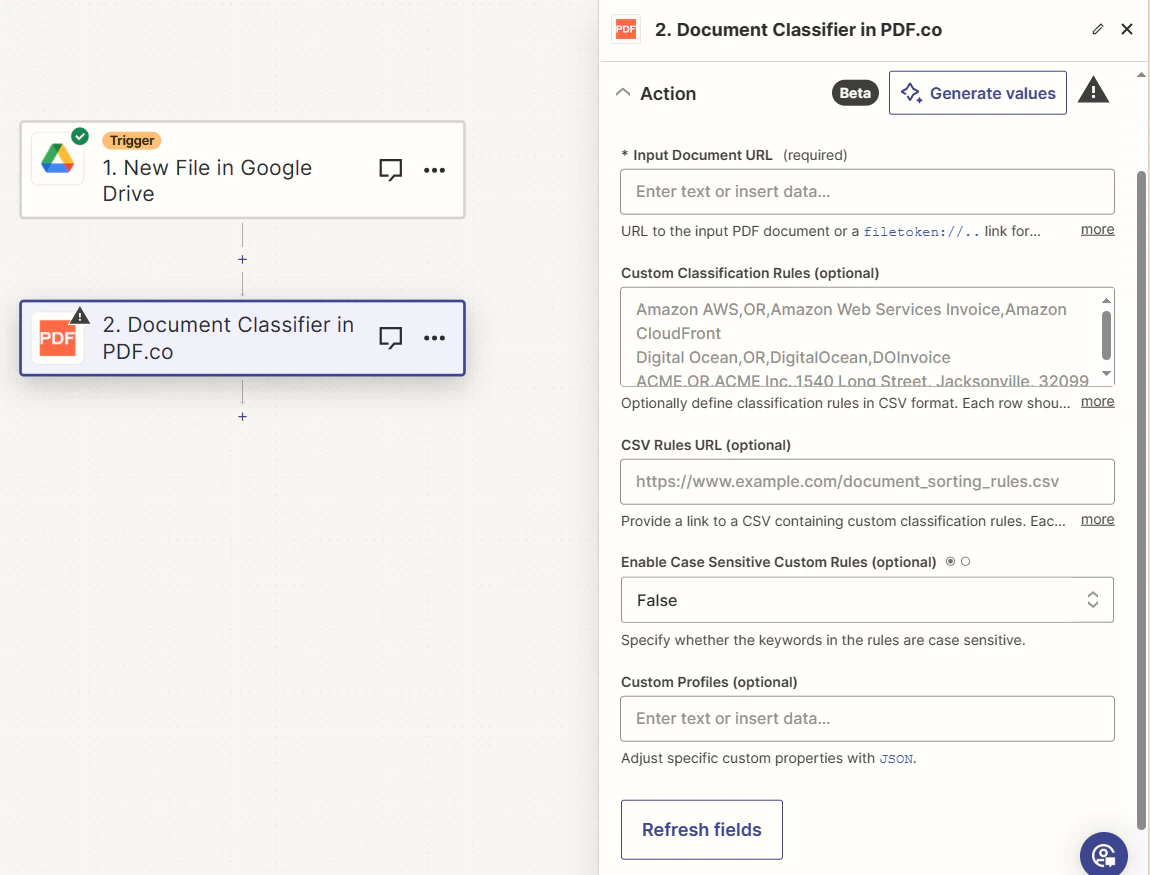 ## Input
| Name | Description | Required |
| -------------------------------------- | ---------------------------------------------------------------------------------------------------------------------------------------------------------------------------------------------------------------------------------------------- | -------- |
| **Input Document URL** | Provide the URL of the input PDF document or a `filetoken://` link from [PDF.co Built-In Files Storage](https://app.pdf.co/files). For other cloud services like Google Drive or Dropbox, ensure the link is publicly accessible. | Yes |
| **Custom Classification Rules** | Define classification rules in CSV format, if required. Format per row: `classname,logic,keyword1,keyword2`. Example: `Amazon,AND,Amazon AWS,AWS Invoice`. Refer to [PDF Classifier](https://pdf.co/pdf-classifier) for detailed instructions. | No |
| **CSV Rules URL** | Provide a URL to a CSV file containing custom classification rules. The format for each row should be: `classname,logic,keyword1,keyword2`. Example: `Amazon,AND,Amazon AWS,AWS Invoice`. | No |
| **Enable Case Sensitive Custom Rules** | Indicate if the keywords in the custom rules should be case sensitive. | No |
| **Custom Profiles** | A `JSON` string which adds options for the conversion process. See [Custom Profiles](#custom-profiles) for more. | No |
### Source PDF URL & Google
When using **Google Drive**, it’s typically recommended to choose the **File** option. For more advanced file integration techniques, see [Integrating File Sources with pdf.co](/integrations/zapier/input-file-sources).
## Input
| Name | Description | Required |
| -------------------------------------- | ---------------------------------------------------------------------------------------------------------------------------------------------------------------------------------------------------------------------------------------------- | -------- |
| **Input Document URL** | Provide the URL of the input PDF document or a `filetoken://` link from [PDF.co Built-In Files Storage](https://app.pdf.co/files). For other cloud services like Google Drive or Dropbox, ensure the link is publicly accessible. | Yes |
| **Custom Classification Rules** | Define classification rules in CSV format, if required. Format per row: `classname,logic,keyword1,keyword2`. Example: `Amazon,AND,Amazon AWS,AWS Invoice`. Refer to [PDF Classifier](https://pdf.co/pdf-classifier) for detailed instructions. | No |
| **CSV Rules URL** | Provide a URL to a CSV file containing custom classification rules. The format for each row should be: `classname,logic,keyword1,keyword2`. Example: `Amazon,AND,Amazon AWS,AWS Invoice`. | No |
| **Enable Case Sensitive Custom Rules** | Indicate if the keywords in the custom rules should be case sensitive. | No |
| **Custom Profiles** | A `JSON` string which adds options for the conversion process. See [Custom Profiles](#custom-profiles) for more. | No |
### Source PDF URL & Google
When using **Google Drive**, it’s typically recommended to choose the **File** option. For more advanced file integration techniques, see [Integrating File Sources with pdf.co](/integrations/zapier/input-file-sources).
 ## Output
| Name | Description |
| --------------------- | ---------------------------------------------------------------------------------------- |
| `url` | The temporary URL on the PDF.co file server. |
| `classes` | An array containing possible category of input document. |
| `outputLinkValidTill` | A timestamp which indicates how long the `url` will be available for. |
| `error` | Details of any errors (if any). |
| `status` | The [response status](/api-reference/introduction) code. If all good this will be `200`. |
| `jobId` | The unique identifier for the job. |
| `credits` | The credits spent on the process. |
| `remainingCredits` | The credits left on your account. |
| `duration` | The time it took for the process. |
## Custom profiles
Use Custom [Profiles](/api-reference/profiles) to enhance your workflow with additional processing options. Enter `JSON` configuration to customize OCR settings, output format, text extraction methods, and more.
## Output
| Name | Description |
| --------------------- | ---------------------------------------------------------------------------------------- |
| `url` | The temporary URL on the PDF.co file server. |
| `classes` | An array containing possible category of input document. |
| `outputLinkValidTill` | A timestamp which indicates how long the `url` will be available for. |
| `error` | Details of any errors (if any). |
| `status` | The [response status](/api-reference/introduction) code. If all good this will be `200`. |
| `jobId` | The unique identifier for the job. |
| `credits` | The credits spent on the process. |
| `remainingCredits` | The credits left on your account. |
| `duration` | The time it took for the process. |
## Custom profiles
Use Custom [Profiles](/api-reference/profiles) to enhance your workflow with additional processing options. Enter `JSON` configuration to customize OCR settings, output format, text extraction methods, and more.
 ### Sample JSON
```json theme={null}
{ "ImageOptimizationFormat": "JPEG", "JPEGQuality": 25, "ResampleImages": true, "ResamplingResolution": 120, "GrayscaleImages": true }
```
You can use any regular API parameter from the [API Reference](/api-reference) within Zapier using the `std_params` feature in profiles. The `std_params` enables the definition of regular API parameters in a JSON format, See [Standard Parameters](/api-reference/profiles#standard-parameters) for detailed documentation and examples.
| Parameter | Type | Default | Description |
| ------------------------------ | ----------------------------- | -------- | ---------------------------------------------------------------------------------------------------------------------------------------------------------------------------------------------------------------------------------------------------------------------------------------------------------------------------------------------------------------------------------------------------------------------------------------------------------------------------------------------------------------------------------------------------------------------------------- |
| `RenderTextObjects` | boolean | `true` | Render text objects or not |
| `RenderVectorObjects` | boolean | `true` | Render vector objects or not |
| `RenderImageObjects` | boolean | `true` | Render image objects or not |
| `TIFFCompression` | string | `LZW` | TIFF compression algorithm. The options are: None, LZW, CCITT3, CCITT4, RLE |
| `OCRMode` | string | `Auto` | Specifies how OCR (Optical Character Recognition) should process input content, offering various modes to tailor text extraction based on content type such as images, fonts, and vector graphics. For more information, see OCR Extraction Modes. |
| `OCRResolution` | integer | `300` | Use this parameter to change the OCR resolution from the default 300 dpi. The range is from 72 to 1200 dpi. |
| `RotationAngle` | integer | `-` | Use manual rotation to handle PDFs with vertically drawn text. Normally, OCR automatically detects page rotation in PDFs and extracts text accurately. However, in some cases, the PDF might not have an actual rotated page --- Rather, the text itself is drawn vertically. In such scenarios, auto-detection may fail. You can use this parameter to manually set the page rotation. The available angles are: 0, 1, 2, 3. |
| `LineGroupingMode` | string | `None` | Controls line grouping in PDF text extraction. Modes: None (no grouping), GroupByRows (merge rows if all cells align), GroupByColumns (merge cells by column), JoinOrphanedRows (merge single-cell rows to above if no separator). |
| `ConsiderFontColors` | boolean | `false` | Controls whether font colors should be considered when detecting table structure and merging text objects during PDF extraction. Set to true to consider font colors. |
| `DetectNewColumnBySpacesRatio` | string | `1.2` | Controls how spaces between words are interpreted for column detection in PDF text extraction. It defines the ratio of space width that determines when text should be treated as being in separate columns. |
| `AutoAlignColumnsToHeader` | boolean | `true` | Controls how columns are detected and aligned during table extraction from PDF documents. It affects both table structure detection and text extraction with formatting preservation. Set to true to automatically align columns to the header row. When set to true (default), the row with the most columns is used as the header, and all other rows are aligned to this structure --- ideal for well-structured tables. When set to false, columns are analyzed independently across all rows to build the structure, which works better for inconsistent or irregular tables. |
| `OCRImagePreprocessingFilters` | object | - | Image preprocessing filters for OCR. Refer to [OCRImagePreprocessingFilters](#ocrimagepreprocessingfilters) for usage examples. |
| `.AddGrayscale` | boolean | `false` | Converts to grayscale before OCR. |
| `.AddGammaCorrection` | array\[string (float format)] | \["1.4"] | Adds a gamma correction filter. |
| `DataEncryptionAlgorithm` | string | - | Controls the encryption algorithm used for data encryption. See User-Controlled Encryption for more information. The available algorithms are: AES128, AES192, AES256. |
| `DataEncryptionKey` | string | - | Controls the encryption key used for data encryption. See User-Controlled Encryption for more information. |
| `DataEncryptionIV` | string | - | Controls the encryption IV used for data encryption. See User-Controlled Encryption for more information. |
| `DataDecryptionAlgorithm` | string | - | Controls the decryption algorithm used for data decryption. See User-Controlled Encryption for more information. The available algorithms are: AES128, AES192, AES256. |
| `DataDecryptionKey` | string | - | Controls the decryption key used for data decryption. See User-Controlled Encryption for more information. |
| `DataDecryptionIV` | string | - | Controls the decryption IV used for data decryption. See User-Controlled Encryption for more information. |
### `OCRImagePreprocessingFilters`
To set image preprocessing filters, please use:
```json theme={null}
{
"profiles": "{
"ExtractShadowLikeText": false,
"OCRMode": "Auto",
"OCRImagePreprocessingFilters.AddGrayscale()": [],
"OCRImagePreprocessingFilters.AddGammaCorrection()": [
1.4
]
}"
}
```
### Sample JSON
```json theme={null}
{ "ImageOptimizationFormat": "JPEG", "JPEGQuality": 25, "ResampleImages": true, "ResamplingResolution": 120, "GrayscaleImages": true }
```
You can use any regular API parameter from the [API Reference](/api-reference) within Zapier using the `std_params` feature in profiles. The `std_params` enables the definition of regular API parameters in a JSON format, See [Standard Parameters](/api-reference/profiles#standard-parameters) for detailed documentation and examples.
| Parameter | Type | Default | Description |
| ------------------------------ | ----------------------------- | -------- | ---------------------------------------------------------------------------------------------------------------------------------------------------------------------------------------------------------------------------------------------------------------------------------------------------------------------------------------------------------------------------------------------------------------------------------------------------------------------------------------------------------------------------------------------------------------------------------- |
| `RenderTextObjects` | boolean | `true` | Render text objects or not |
| `RenderVectorObjects` | boolean | `true` | Render vector objects or not |
| `RenderImageObjects` | boolean | `true` | Render image objects or not |
| `TIFFCompression` | string | `LZW` | TIFF compression algorithm. The options are: None, LZW, CCITT3, CCITT4, RLE |
| `OCRMode` | string | `Auto` | Specifies how OCR (Optical Character Recognition) should process input content, offering various modes to tailor text extraction based on content type such as images, fonts, and vector graphics. For more information, see OCR Extraction Modes. |
| `OCRResolution` | integer | `300` | Use this parameter to change the OCR resolution from the default 300 dpi. The range is from 72 to 1200 dpi. |
| `RotationAngle` | integer | `-` | Use manual rotation to handle PDFs with vertically drawn text. Normally, OCR automatically detects page rotation in PDFs and extracts text accurately. However, in some cases, the PDF might not have an actual rotated page --- Rather, the text itself is drawn vertically. In such scenarios, auto-detection may fail. You can use this parameter to manually set the page rotation. The available angles are: 0, 1, 2, 3. |
| `LineGroupingMode` | string | `None` | Controls line grouping in PDF text extraction. Modes: None (no grouping), GroupByRows (merge rows if all cells align), GroupByColumns (merge cells by column), JoinOrphanedRows (merge single-cell rows to above if no separator). |
| `ConsiderFontColors` | boolean | `false` | Controls whether font colors should be considered when detecting table structure and merging text objects during PDF extraction. Set to true to consider font colors. |
| `DetectNewColumnBySpacesRatio` | string | `1.2` | Controls how spaces between words are interpreted for column detection in PDF text extraction. It defines the ratio of space width that determines when text should be treated as being in separate columns. |
| `AutoAlignColumnsToHeader` | boolean | `true` | Controls how columns are detected and aligned during table extraction from PDF documents. It affects both table structure detection and text extraction with formatting preservation. Set to true to automatically align columns to the header row. When set to true (default), the row with the most columns is used as the header, and all other rows are aligned to this structure --- ideal for well-structured tables. When set to false, columns are analyzed independently across all rows to build the structure, which works better for inconsistent or irregular tables. |
| `OCRImagePreprocessingFilters` | object | - | Image preprocessing filters for OCR. Refer to [OCRImagePreprocessingFilters](#ocrimagepreprocessingfilters) for usage examples. |
| `.AddGrayscale` | boolean | `false` | Converts to grayscale before OCR. |
| `.AddGammaCorrection` | array\[string (float format)] | \["1.4"] | Adds a gamma correction filter. |
| `DataEncryptionAlgorithm` | string | - | Controls the encryption algorithm used for data encryption. See User-Controlled Encryption for more information. The available algorithms are: AES128, AES192, AES256. |
| `DataEncryptionKey` | string | - | Controls the encryption key used for data encryption. See User-Controlled Encryption for more information. |
| `DataEncryptionIV` | string | - | Controls the encryption IV used for data encryption. See User-Controlled Encryption for more information. |
| `DataDecryptionAlgorithm` | string | - | Controls the decryption algorithm used for data decryption. See User-Controlled Encryption for more information. The available algorithms are: AES128, AES192, AES256. |
| `DataDecryptionKey` | string | - | Controls the decryption key used for data decryption. See User-Controlled Encryption for more information. |
| `DataDecryptionIV` | string | - | Controls the decryption IV used for data decryption. See User-Controlled Encryption for more information. |
### `OCRImagePreprocessingFilters`
To set image preprocessing filters, please use:
```json theme={null}
{
"profiles": "{
"ExtractShadowLikeText": false,
"OCRMode": "Auto",
"OCRImagePreprocessingFilters.AddGrayscale()": [],
"OCRImagePreprocessingFilters.AddGammaCorrection()": [
1.4
]
}"
}
```